Find businesses that need a website. Sell them one.
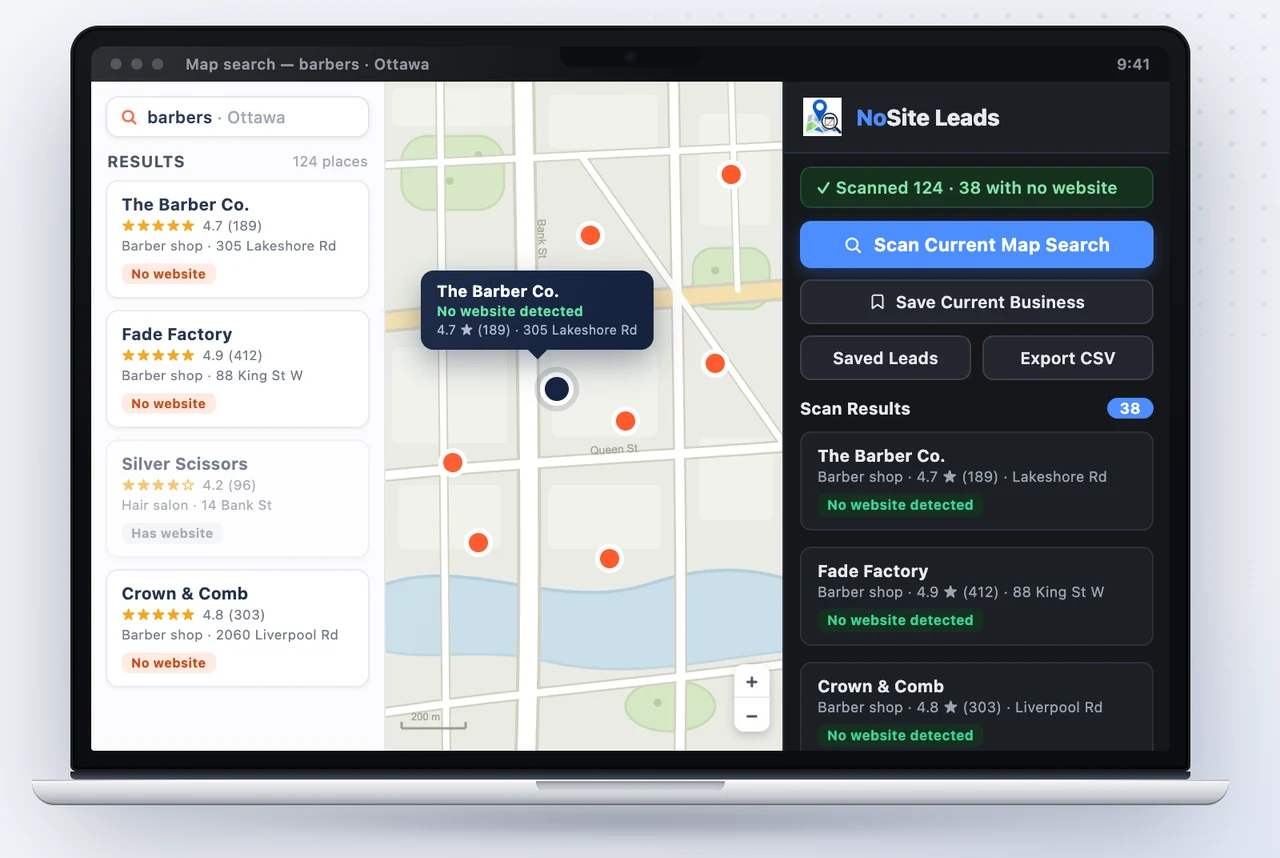
NoSite Leads Helper scans the map search you already have open, flags every business with no website, and hands you their name and phone number. Your prospect list builds itself.
5 free scans no account needed leads never leave your browser
Cold outreach is a numbers game. Win it with a better list.
Selling websites to local businesses means calling businesses that don't have one. The calls aren't the hard part — the qualified list is. Guessing from directories or wandering the high street doesn't scale.
Every business with no website is a warm prospect — and Google Maps already knows exactly who they are. NoSite reads the search results you're already looking at and pulls those businesses out for you.
How it works
From Maps search to call list in under a minute
Search your niche on Google Maps
Type any niche + city — “barbers ottawa”, “plumbers leeds”. Works on every Google Maps country and language domain.
Scan the page in one click
Hit Scan Current Map Search. The extension auto-scrolls the whole results list and reads each business from Google's own results data — name, phone, address, rating, category. A ~120-business search takes well under a minute.
Call the ones with no website
Businesses without a website are flagged instantly. Save them, track call status and notes in the built-in mini-CRM, and export everything to CSV when it's time to dial.
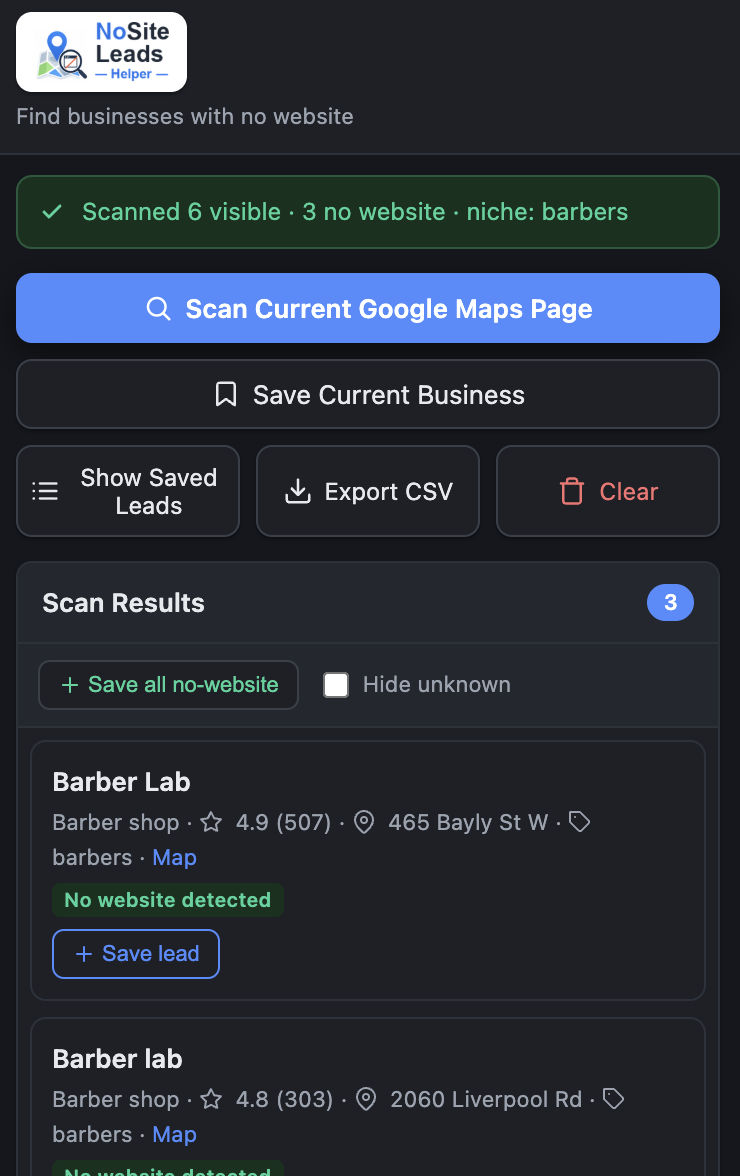
A real scan: three barbershops with no website, flagged and ready to save.
Features
Everything you need to hunt, nothing you don't
One-click scan
Scan a whole results page — around 120 businesses per search — with automatic scrolling. No copy-paste, no tab-hopping.
No-website detection
Reads Google's own results data to flag every business without a website. Those are your leads.
Built-in mini-CRM
Track every lead through “Not Called”, “Interested”, “Sent Mockup” and more, with notes per business.
CSV export
One click turns your saved leads into a clean CSV for your dialer, your spreadsheet, or the CRM you already use.
Scan goals up to 1,000
Pick a bigger goal, pan the map, hit “Search this area”, scan again. Results stack, with a progress bar toward whole-city coverage.
Private by design
Leads live in your browser and are never uploaded. We only ever see an anonymous device token — no account, no login.
Pricing
Free to try. Cheap to run.
One closed client pays for years of Premium.
Free
Prove it works on your own city
£0
- 5 free scans
- Full no-website detection
- Mini-CRM statuses and notes
- CSV export
- Saved leads stay yours forever
Unlimited
Premium
For serious client hunting
£4.99/month
- Unlimited scans
- Scan goals up to 1,000 businesses
- Everything in Free
- No account — linked to your browser
- Cancel anytime, two clicks
Payments by Stripe. Cancel in two clicks from the billing portal.
FAQ
Fair questions, straight answers
Is this allowed?
You browse Google Maps yourself, in your own tab — the extension simply reads the results Google already sent to your browser for the search you opened. No bots, no automated visits, no mass scraping. It's a helper for work you're already doing by hand.
Why about 120 results per search?
That's Google's own server-side cap — Maps serves roughly 120 results per search no matter what you do. To go beyond it, pick a bigger scan goal (up to 1,000), pan the map, hit “Search this area”, and scan again. Results stack, with a progress bar toward your goal.
Where are my leads stored?
In your browser only, in the extension's local storage. They're never uploaded to us or anyone else. Export them to CSV any time you like.
Do I need an account?
No — there are no accounts and no login. Premium is linked to an anonymous device token through Stripe Checkout: hit Upgrade inside the extension and your browser is recognised automatically after payment.
How do I cancel?
Through Stripe's billing portal — two clicks. Open it from the extension's Manage button, or manage your subscription from this site. Cancelling stops the renewal; access runs to the end of the billing period.
What happens after my 5 free scans?
Everything you saved stays accessible and exportable — your leads are yours. Running new scans needs Premium at £4.99/month, cancel anytime.
How do I get support?
Email contact@josephsamadi.uk — you'll get a reply from the developer, usually within a day. For billing questions, include the email you used at checkout; for scan issues, the niche and city you searched. The support page covers the most common questions.
Your next client doesn't have a website — yet.
Install NoSite Leads Helper, run your first scan free, and start calling businesses that actually need you.
Add to Chrome — free